

ubuntu 提交 github 提示403
如果常规提不上去,那就通过ssh提交。
先生成密钥:
效果:
liguoyi@liguoyi-virtual-machine:~/rk3566-ubuntu22-rootfs/ubuntu22.04-rootfs$ ssh-keygen -t ed25519 -C "liguoyi001@qq.com"
Generating public/private ed25519 key pair.
Enter file in which to save the key (/home/liguoyi/.ssh/id_ed25519):
Enter passphrase (empty for no passphrase):
Enter same passphrase again:
Your identification has been saved in /home/liguoyi/.ssh/id_ed25519
Your public key has been saved in /home/liguoyi/.ssh/id_ed25519.pub
The key fingerprint is:
SHA256:N9Ih3yMBeoDEBkYHiFF00muIlbN1n2PgkNhGPBA5svQ liguoyi001@qq.com
The key's randomart image is:
+--[ED25519 256]--+
|o*@/=o. .        |
|+oB+& oo .       |
|.=.O *.oo.o      |
|o oEo ..=+ +     |
|   .   .S.* o    |
|         o o .   |
|                 |
|                 |
|                 |
+----[SHA256]-----+
查看生成的密钥:
将输出的一串内容复制粘贴到你github账号的设置下的sshkey中:
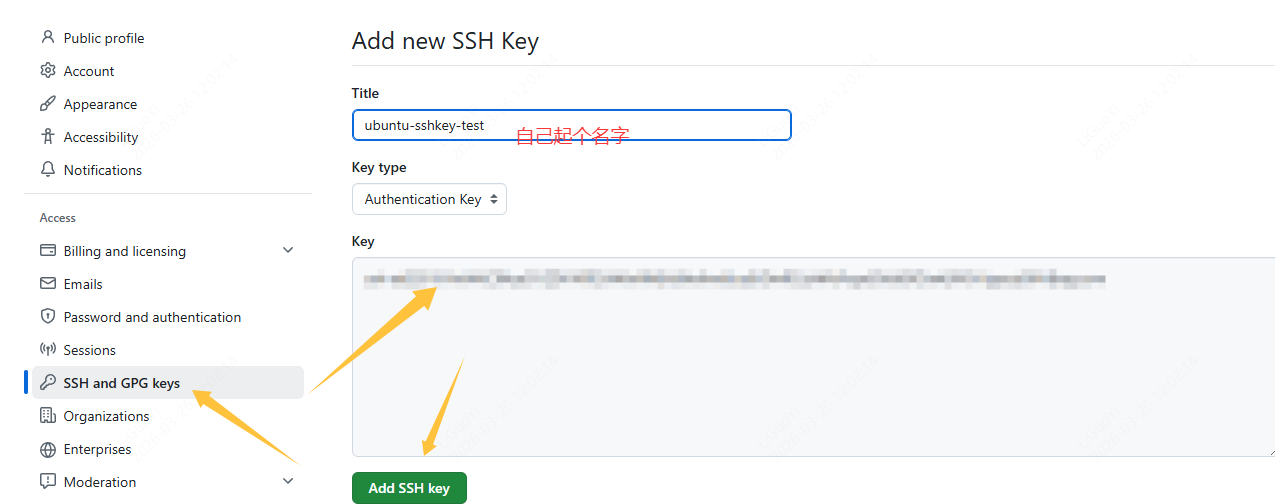
完成后保存。然后回到命令行验证:
如果没有问题你会看到:
完成,你可以尝试提交了。


评论